
/* Fancy SVG Draw */
[SVG Draw]
Bring logos, icons, and diagrams to life with a drawing animation, safely.
- Upload an SVG and choose when it draws. No CSS animation to write and no Lottie file to export.
- WordPress blocks SVG uploads for good reason, so every file is cleaned on the server and the raw upload never reaches visitors.
- northsideroasters.com
Northside Roasters
Shop, Wholesale, Visit
Small-batch coffee, roasted in Brooklyn
Greenpoint, New York
100% drawn
Scroll down ↓
Examples
Drawn while visitors watch.
The hero logo finishes as you scroll, the diagram follows your scroll, and the icons draw when you point at them. Brands and copy are sample content.
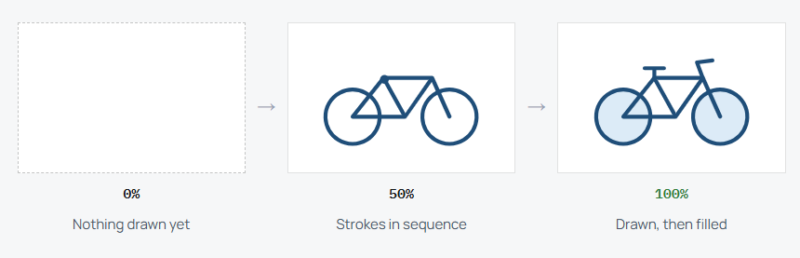
[ Order: Sequence ] [ Stagger: 0.2s ] [ Fill: After stroke ]
Example 01
From empty to filled
The paths draw one after another, and once the last stroke lands the wheels fade in their fill. That is the After stroke fill setting.
- northsideroasters.com/subscribe
How your subscription works
Scroll-scrub: drawing follows your scroll 100%
[ Trigger: Scroll-scrub ] [ Order: Sequence ] [ Stroke color: override ]
Example 02
A diagram paced by the reader
Each step and connector draws as the visitor scrolls down, and undraws if they scroll back. Here the line has reached the second step.
Example 03
Draws on hover
Four outlined feature icons wait in a faint grey. Pointing at one draws it in the accent color, and moving away reverses it. Try the other three.
[ Columns, Small: 1 ] [ Status Badge: On ]
Secure checkout
Fast delivery
Roast reports
Talk to a roaster
[ Trigger: Hover ] [ End: Reverse ] [ Stroke width: 2.6 for all paths ]
[ Best with line art ]
The effect draws strokes, so line art and outlined icons give the best result. A solid filled shape has little outline to draw, though its fill can still fade in once the drawing finishes.
See it working on a real Avada site.
What you can build
Graphics that arrive one line at a time.
On page load
A logo that draws itself
Open the homepage with your mark sketching itself in the hero. It plays once on load, then stays put so the page settles.
Scroll-scrub
Diagrams drawn step by step
Tie a process or how-it-works graphic to the scroll so each stage appears as the reader reaches it. Scrolling up takes it back.
On hover
Icons that respond to a pointer
Give a features grid a small reaction. Each outlined icon draws when hovered and reverses when the pointer leaves.
Features
Control over every stroke.
Four draw triggers
On page load, when scrolled into view, on hover, or scroll-scrub tied to scroll position.
Together or in sequence
Draw every path at once, or one after another with a stagger.
Duration, delay, easing
Set how long it takes, when it starts, and how it speeds up or slows down.
Fill timing
Fill after the stroke, before it, or not at all.
End behavior
Stay drawn, reverse to undraw, or loop.
Stroke overrides
One stroke color and width for all paths, to match your brand or even out mixed line weights.
Cleaned on the server
Every file is sanitized before use, up to 300 KB. The raw upload is never shown.
Accessible and motion-aware
Labeled as an image with your description; reduced-motion visitors see the finished drawing.
Dynamic Data and spacing
The SVG source accepts Avada Dynamic Data, and margins and padding can be set per breakpoint.
Works the Avada way
Upload, pick a trigger, publish.
Choose the file, decide when it draws and how the fill arrives, and set what happens once it is done.
[ ]
Avada Builder
Select your SVG, or a Dynamic Data source, and choose the trigger in the element options.
[ ]
Global colors
The stroke color override can use one of your Avada global colors.
[ ]
Avada Live
Watch the drawing play on the page you are editing.
[ ]
Live option updates
Duration, stroke width, and spacing per breakpoint update as you change them.
FAQ
SVG Draw questions
Related elements
Fancy Text Mask
Photos inside your headline
Fill large heading letters with an image or gradient while keeping them real text.
Fancy Timeline
Milestones in order
Lay out a history, process, or roadmap vertically or as a swipeable row.
Fancy Image Scroller
Long images in a small frame
A fixed frame that pans across a tall screenshot or wide panorama.