
- yoursite.com/guides/avada-speed-checklist
Guide / 16 checks / 12 min read
The 2026 Avada Speed Checklist
Get the most speed out of your Avada site. A handful of settings make the biggest difference: right-sized hero images, only the font weights you use, and the features you don’t need switched off.
This checklist walks through the 16 settings we check first on every client site, in the order that saves the most load time for the least effort.
- Turn off the features you do not use
- Serve hero images as WebP under 200 KB
- Load only the font weights in your design
- Enable lazy loading for images and iframes
- Combine and defer non-critical JavaScript
- Set a page cache and test it logged out
- Limit Google Fonts to one or two families
- Move tracking scripts to load after interaction
Examples
An overlay over the good part, gone after one short form.
The overlay, its heading and description, and the form inside it come from the element and your Avada Forms.
[ Before submit ]
- yoursite.com/guides/avada-speed-checklist
The 2026 Avada Speed Checklist
Sixteen settings worth checking before you touch a caching plugin, ordered by how much time each one saves.
- Turn off the features you do not use
- Serve hero images as WebP under 200 KB
- Load only the font weights in your design
- Enable lazy loading for images and iframes
- Combine and defer non-critical JavaScript
- Set a page cache and test it logged out
- Limit Google Fonts to one or two families
- Move tracking scripts to load after interaction
[ After submit ]
- yoursite.com/guides/avada-speed-checklist
The 2026 Avada Speed Checklist
Sixteen settings worth checking before you touch a caching plugin, ordered by how much time each one saves.
- Turn off the features you do not use
- Serve hero images as WebP under 200 KB
- Load only the font weights in your design
- Enable lazy loading for images and iframes
- Combine and defer non-critical JavaScript
- Set a page cache and test it logged out
- Limit Google Fonts to one or two families
- Move tracking scripts to load after interaction
+ 8 more checks
[ Mode: Wrap ] [ Gate Form: Subscribe Form ] [ Remember Reveal: This session ]
Example 01
Before and after the form
The overlay sits over the blurred checklist and always matches its size. Once the Avada Form succeeds, the overlay goes and the list is readable. With Remember Reveal on this session, it stays open while the visitor browses.
- harborstudio.com/work/fieldline
Case study
How Fieldline rebuilt their store in six weeks
Fieldline sells outdoor gear across three countries. Their old site had grown to 40 plugins and a checkout nobody wanted to touch.
- Budget: $18,000, fixed price
- Timeline: six weeks from kickoff to launch
- Load time: 4.8 s down to 1.6 s on mobile
- Checkout conversion: up 22% in the first month
[ Mode: Selector ] [ Target Selector: #results ] [ Remember Reveal: Persistent (30 days) ]
Example 02
Case study with selector mode
The results block already exists on the page, so the gate targets it by CSS selector instead of wrapping it. A Baltic Blue overlay and heavier blur change the look, and a cookie remembers the reveal for 30 days.
- 9:41 yoursite.com
Guide
The 2026 Avada Speed Checklist
A few settings make the biggest difference. Start with the settings below.
- Turn off the features you do not use
- Serve hero images as WebP under 200 KB
- Load only the font weights in your design
- Enable lazy loading for images and iframes
- Combine and defer non-critical JavaScript
- Set a page cache and test it logged out
- Limit Google Fonts to one or two families
- Move tracking scripts to load after interaction
Example 03
Locked state on a phone
Fields stack into a single column, and a maximum form width keeps them tidy on wide sections too.
Example 04
The settings panel
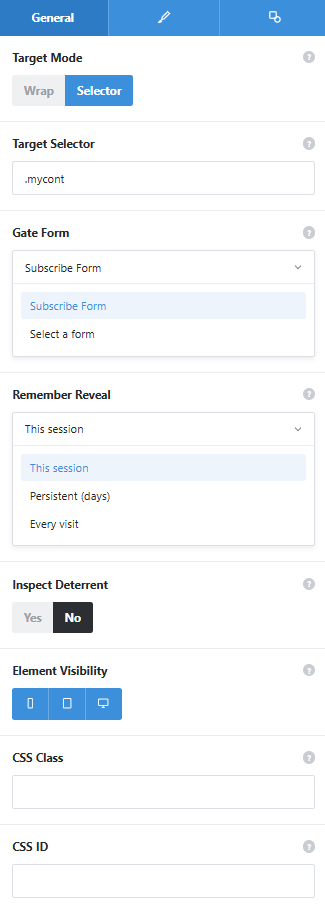
The General tab with selector mode on and the dropdowns opened. Overlay heading, description, background, blur, and typography sit on the Design tab.
Target Mode
Wrap puts the gated content inside the element so the overlay always lines up. Selector points at an existing section you cannot move.
Target Selector
The CSS selector used in selector mode, such as a class or ID on the section.
Gate Form
The Avada Form visitors must submit. With no form chosen, visitors see no overlay and editors see a warning.
Remember Reveal
This session, persistent for a number of days, or every visit.
Inspect Deterrent
A minor context menu block on the gated area. A deterrent, not protection.
[ Being upfront ]
Content Gate is built to encourage sign-ups, not to restrict access. The gated content is never removed from the page source, so it is not encrypted or held back by the server, and the optional inspect deterrent only blocks the context menu. Do not use it for confidential documents or anything people pay for; a membership plugin is the right tool there.
See it working on a real Avada site.
What you can build
Content good enough that people trade an email for it.
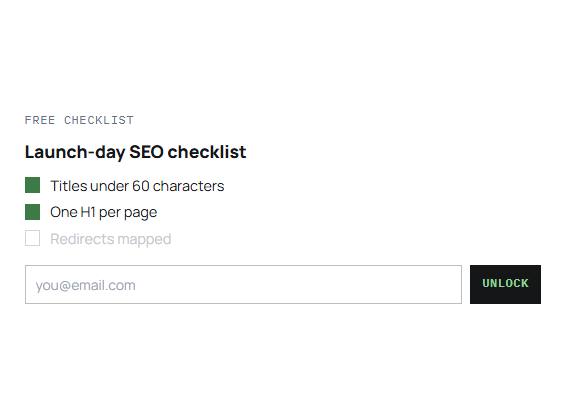
Guides that grow your list
Publish a checklist or how-to guide with the first section open to everyone. Readers who want the rest join your mailing list to get it.
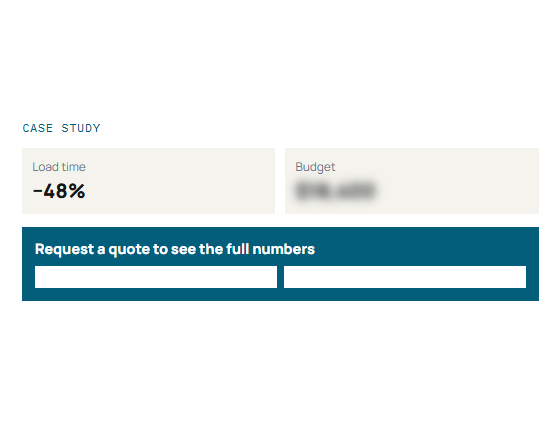
Case studies after a quote request
Show the client story in full but keep budget and timeline details behind a short quote form. The people who fill it in are the ones already pricing up a project.
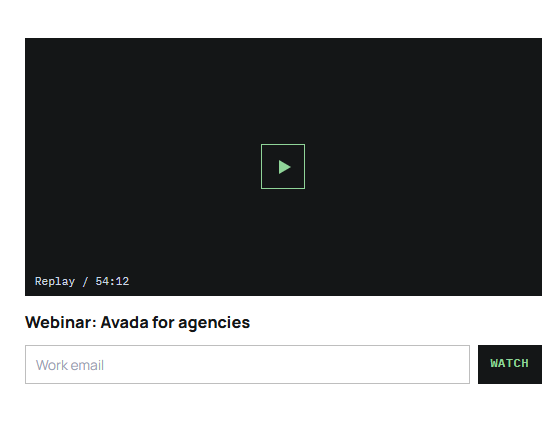
Webinar replays and bonus files
Put a recorded session or a download link behind a registration form. You get a contact list of everyone who watched.
Features
What the gate gives you.
Wrap mode
Put the gated content inside the element and the overlay always matches its size.
Selector mode
Target an existing section by CSS selector, and the overlay stays aligned as it resizes.
Avada Form reveal
Pick a form from your site; a successful submission removes the overlay.
Leads go where they already go
Notifications, stored entries, and integrations follow the form’s own settings.
Remember reveal
Remember a reveal for the session, for a set number of days, or ask every visit.
Overlay design
Background color, blur, padding, maximum form width, and z-index.
Heading and description
Set the overlay copy and typography, with Dynamic Data support.
Optional inspect deterrent
A minor context menu block on the gated area, off by default.
Reduced motion aware
For visitors who prefer reduced motion, the overlay is removed instantly.
Works the Avada way
Uses the forms you already have.
The gate works with Avada Forms, so you do not need another form or lead plugin.
[ ]
Avada Builder
Add the gate, choose wrap or selector mode, and pick your form.
[ ]
Global colors and typography
The overlay background, heading, and description can use your global settings.
[ ]
Avada Live
Style the overlay on the front end and see the blur over real content.
[ ]
Live option updates
Overlay and style changes show in the builder as you make them.
FAQ
Content Gate questions
Related elements
Fancy Content Protection
Discourage casual copying
Block text selection and image dragging, on images only or across the whole page.
Fancy Reveal Offer
A small reward behind a scratch card
Visitors scratch a cover away to uncover the coupon or message you set.
Fancy Cost Calculator
Instant estimates from visitor inputs
Sliders, dropdowns, and checkboxes add up to a formatted price as people choose options.