
- northboundtrips.com/iceland
Northbound
Tours, Journal, Contact
ICELAND
Eight days on the Ring Road, from Reykjavík to the glacier lagoons.
Real H1 text. Selectable, searchable.
Examples
Pictures and gradients inside real words.
The hero headline drifts a little as you scroll, using the parallax option. Places, brands, and articles are sample content.
- voyagerquarterly.com/provence
Travel, July issue
Summer in Provence
By Claire Moreau
Lavender fields peak in early July, and the markets in Aix fill up by nine. We spent two weeks between the Luberon villages and the coast to find the slower version of a busy season.
[ Fill: Gradient ] [ Tag: H2 ] [ Font: Playfair Display, italic 900 ]
Example 01
A gradient for a magazine title
No photo needed. A warm orange-to-pink gradient runs through the letters, and the heading sits above the article as a normal H2.
- alpineroutes.ch/summer
ALPS
Icon + text, one image across both
[ Icon: Mountain ] [ Fill: Image ] [ Fit: Cover, center top ]
Example 02
Icon and word, one picture
The mountain icon and the word ALPS sit in the same mask, so a single snowy photo runs across both instead of restarting in each.
Example 03
Real text, at any width
On the left, the headline is selected with the cursor like any other words on the page. On the right, the same heading on a phone, scaled down by its fluid font size.
- northboundtrips.com/iceland
ICELAND
Selected “ICELAND” Copy, Search, Translate
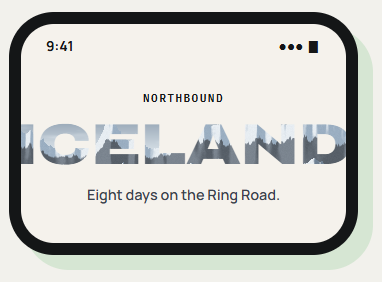
[ Font size: Fluid (clamp) ] [ Tag: H1 ] [ Fallback color: #3E5C78 ]
[ Text, not a picture ]
A photo-in-letters headline is usually exported as a flat image, which search engines and screen readers cannot read. Here the letters are a real heading with a fill behind them, so the words stay indexable, readable aloud, and easy to change.
See it working on a real Avada site.
What you can build
Headlines that carry the picture.
Fjord & Field Outfitters
ICELAND
Hiking trips, June to September
Travel and outdoor heroes
Let a destination photo fill the name of the place itself. Tour operators, outdoor shops, and lifestyle brands get a cover-style opening that is still a proper H1.
Issue 14
The Food Issue
Magazine-style section titles
A gradient fill gives each category or issue its own color without making new artwork. Swap the colors from one feature to the next in a few clicks.
BERLIN
Design Week, May 12 to 16
Event and launch pages
Combine an icon, the event name, and a photo under a gradient for a headline that reads well on a busy image. The date beneath stays plain text.
Features
Fill, type, and fit.
Image, gradient, or both
Layer a gradient over a photo with a blend mode to keep busy images readable.
Icons in the mask
Avada icons join the text, with one continuous image running through both.
Fit and position
Cover or contain, plus background position to frame the part of the image you want.
Optional parallax
The image drifts on scroll at an intensity you set, and stops for reduced-motion users.
Real heading tag
Output as H1 to H6, DIV, P, or SPAN for correct page structure.
Type controls
Font family, weight, text transform, line height, letter spacing, and alignment.
Responsive font size
Fluid with clamp, viewport width, or fixed pixels.
Solid fallback color
Shown if the image fails to load or a browser cannot clip to text.
Dynamic Data and spacing
Image and gradient accept Avada Dynamic Data; margins and padding per breakpoint.
Works the Avada way
A heading element with a fill behind it.
Type the words, choose what shows through them, and set how the image sits inside the letters.
[ ]
Avada Builder
Write the headline in the element and choose the image, gradient, or icon right beside it.
[ ]
Global colors and typography
Gradient stops, fallback color, and font can come from your Avada global settings.
[ ]
Avada Live
Edit the words on the page itself and the fill follows the new letters.
[ ]
Live option updates
Fit, position, parallax intensity, and per-breakpoint spacing change on screen as you adjust them.
FAQ
Text Mask questions
Related elements
Fancy Image Scroller
Long images in a small frame
A fixed frame that pans across a tall screenshot or wide panorama.
Fancy Reveal Offer
A scratch card for real offers
Visitors scratch a cover to uncover a discount and copy the code.
Fancy Filterable Gallery
Images sorted into groups
Filter buttons, grid or masonry, and a lightbox for the images on screen.